Skin retouching
Dodge & Burn vs. Frequency Separation: Where Olune Skin Fits
Choose the right skin-retouching technique for the job, then see how Olune Skin removes the slow setup without replacing dodge and burn or your judgment.
You have thirty minutes, twenty portraits, and one question: dodge and burn or frequency separation?
Choose only dodge and burn and the finish may be beautiful — sometime tomorrow. Push only frequency separation and the whole set may be finished quickly — with twenty versions of the same flattened skin.
The useful answer is not choosing a side. It is knowing which work deserves your time.
Olune Skin was built for that middle ground. It removes the slow, repetitive part of frequency separation: building the stack, calculating layers, preparing brushes, detecting skin, and organizing masks. It does not replace dodge and burn. It gets you to it faster when luminosity and shape are the real problem.
The decision table comes first
| The job | Start here | Bring in Olune Skin when… |
|---|---|---|
| Twenty clean portraits on a deadline | Olune Auto + light D&B | You need a consistent FS setup in one click |
| One campaign beauty close-up | Local D&B + Olune Manual FS | Color or texture needs separate control |
| Patchy foundation with intact pores | Olune Smoothing / Low Frequency | The color is wrong but the surface is good |
| Small bright bump with good texture | Local Burn | You probably do not need FS at all |
| Red blemish with damaged pores | Olune Healing, then Smoothing | The defect contains texture and color |
| Deep under-eye hollow | Dodge & Burn | Keep Olune for nearby color or texture cleanup |
| Broad reflected color on skin | Olune Smoothing or targeted color | The issue remains visible when zoomed out |
| Freckles that must remain | Minimal cleanup + D&B | Use Reveal Texture if a correction crosses them |
Save the table. The rest of this article explains why it works.
Frequency separation separates the problem
A blemish is rarely one thing. It may contain broken pores, red color, a bright center, and a dark rim.
Frequency separation lets you reach those components independently:
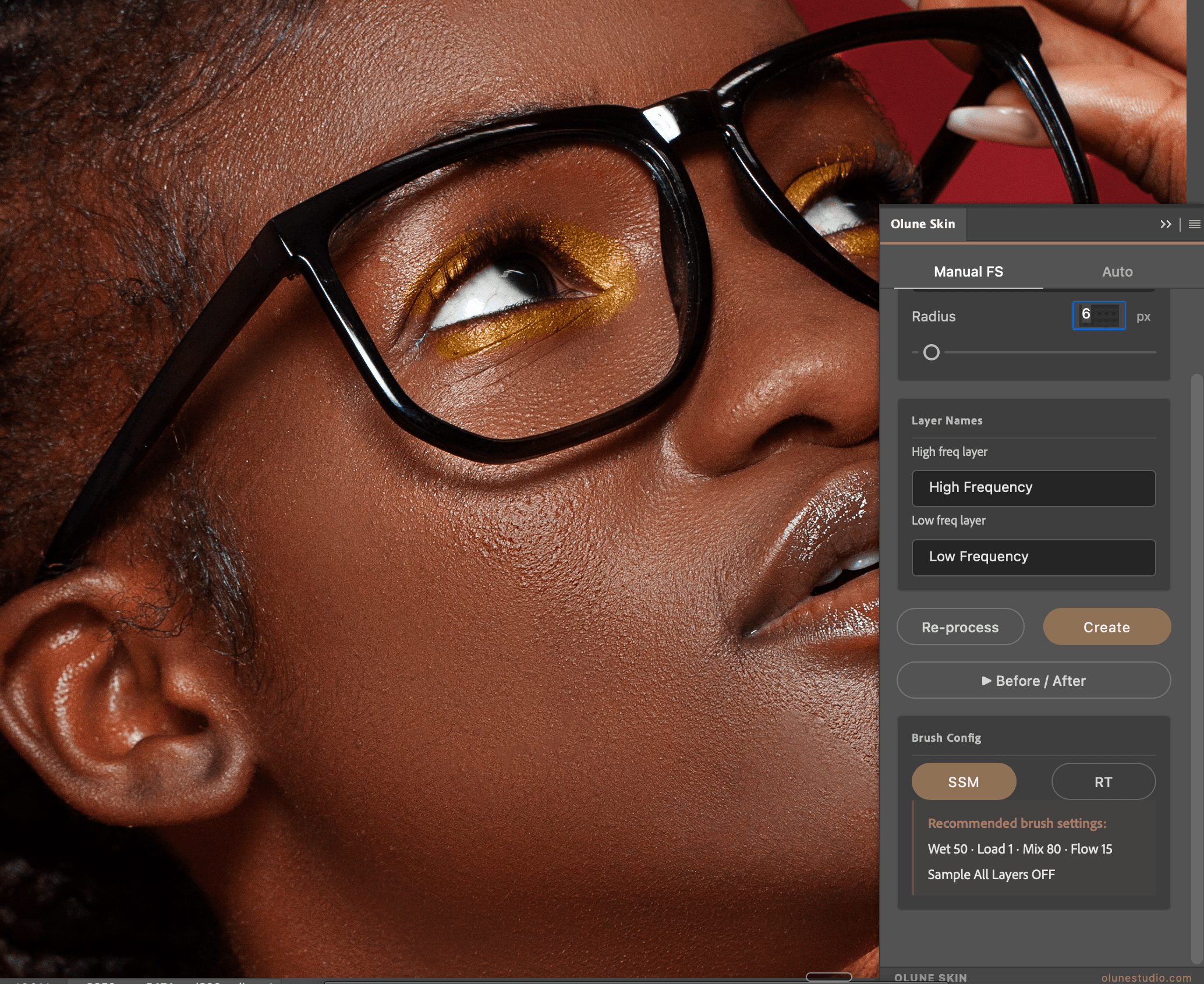
- High Frequency / Healing: pores, fine lines, short hairs, sharp texture.
- Low Frequency / Smoothing: color, broad luminosity, foundation, gradual transitions.
- Texture mask / Reveal Texture: restores detail where the correction became too clean.
Olune Skin can build that workspace in Auto or Manual mode. Manual adds four filter choices, a 1–100 px radius, Re-process, custom layer names, and preconfigured SSM and RT brushes. Auto builds the stack, prepares the skin selection, and activates the brush in one click.
That makes frequency separation fast. It does not make broad smoothing safe.
Use it when separating texture from color makes the correction smaller and cleaner. Leave it when the defect is really a lighting problem.
Dodge and burn shapes the problem
Dodge and burn changes luminosity without replacing the underlying texture.
Darken a small bright bump and it can disappear while every pore remains. Lift the deepest part of an under-eye transition and the face looks rested without losing the eye socket. Shape a cheek highlight and attention moves without touching skin color at all.
This is why high-end beauty retouchers rely on local dodge and burn. It offers precise control over form.
It is also slow.
Using dodge and burn to fix every red patch, makeup break, and damaged pore can turn a portrait set into a week-long project. Precision becomes waste when the problem belongs to a different scale.
Find your faster split
Try Olune Skin free for 14 days. Use Manual FS on one portrait, Auto on the next, then keep dodge and burn for the transitions that still need it. No card required.
Local D&B and global D&B are different jobs
Local dodge and burn works on small luminosity interruptions: the bright edge of a blemish, a dark pore cluster, or a short uneven transition.
Global dodge and burn controls the portrait’s larger shape: cheekbones, forehead, jaw, highlights, and attention.
Keep them on separate layers. Local cleanup may need full strength while global shaping looks better at 40%. Combining them makes every later decision harder.
Olune Skin belongs before or between those passes. Use it to clean specific texture and color problems; return to D&B for form. The workflow should move by scale, not by loyalty to a technique.
The hybrid Olune workflow
1. Begin with a balanced raw conversion
Set exposure, white balance, and broad contrast. Do not make skin tools repair clipped highlights or a bad color temperature.
2. Clean temporary distractions
Remove flakes, lint, active blemishes, and stray hairs on a blank layer. Preserve freckles, scars, and permanent features unless the brief says otherwise.
3. Open Olune Skin only for problems that benefit from separation
Use Healing for damaged texture and Smoothing for localized color variation. Keep each mask smaller than the skin selection. Use Reveal Texture when the finish becomes too clean.
4. Switch to local dodge and burn
Correct the remaining bright and dark interruptions. Work at low flow and follow the existing light.
5. Shape with global dodge and burn
Guide attention rather than redesigning the face. The original lighting should still be recognizable.
6. Compare, reduce, stop
Use Olune’s inline Before/After at 100%, 50%, and fit-to-screen. If lowering the full skin group to 75% improves the portrait, keep 75%.
No client is paying for maximum layer opacity.
When not to use Olune Skin
A trustworthy tool should make this answer easy.
Do not build frequency separation for one tiny blemish that a cleanup layer can solve. Do not use Smoothing for a shadow that defines the cheek. Do not run Auto across a finished file because “one more pass” feels productive.
Olune Skin is strongest when you need controlled access to texture and color, especially across a portrait set. It is unnecessary when the problem is already isolated and simple.
Skipping the plugin for thirty seconds can be as professional as using it for twenty minutes.
Bad technique has recognizable fingerprints
Overworked frequency separation leaves texture floating over flat color, repeated pores, soft edges, and halos around the mask.
Overworked dodge and burn leaves gray highlights, oversaturated shadows, false contour, and skin that is technically untouched but equally lifeless.
Neither technique is naturally safe. Small corrections are safe. Frequent comparisons are safe. Knowing why you opened a layer is safe.
Let Olune remove the clicks
The retoucher should decide what stays, what goes, and how polished the final skin feels. The software should handle the parts that are identical every time.
That is the role of Olune Skin: less setup, faster correction, full control when the face needs something different.
Download the complete Olune Skin trial and use it on a real portrait set for 14 days. If the setup becomes invisible and your judgment gets more time, the plugin is doing exactly what it should.
The winning workflow is not frequency separation or dodge and burn.
It is Olune for the repeatable work, dodge and burn for the light, and you for every decision that matters.